
The operations platform built for challenger food and drink brands
Pesto runs orders, stock, costs, suppliers and invoicing for food and drink brands in one AI-native platform. It reads purchase orders in any format, matches them to each customer's codes and prices, tracks every batch, plans supplier orders, costs production at actual lot cost and invoices in Xero. It's the food and drink ERP we wished we'd had.

How does an order move through Pesto, from PO to cash?
Every order follows the same path, whether it came from a Sainsbury's EDI feed or a buyer's phone photo of a printed PO.
Step 1
The order lands
Upload up to 10 files at once, forward the email, paste the thread, or let Shopify, EDI or your B2B ordering portal bring it in.
Step 2
Pesto reads and matches it
Pesto pulls out the PO number, dates, depot and every line. It finds the depot by GLN, then postcode, then address, and matches each line by your customer's own product code. That's order normalisation.
Step 3
Pesto checks the price
It fills missing prices from the customer's price list and flags any mismatch as "Expected: £x".
Step 4
You approve it
You see the original beside Pesto's version. Approval stays locked until the customer, depot and products all match.
Step 5
Pesto picks the right batch
It pre-selects lots by FEFO or FIFO, location and each customer's minimum shelf life.
Step 6
Pesto sends it to your 3PL
It generates the delivery note with batch code and use-by, then routes the order to your 3PLs (WMS), e.g. Mintsoft, Pimento, Hive.
Step 7
Pesto invoices what you shipped
It raises the invoice in your accounting software (e.g. Xero, Sage, QuickBooks) from dispatched quantity at the order price and flags customers who owe you before you ship them more.
Save 75% of the time you spend on manual order management.
How does Pesto plan stock, from demand to delivery?
Step 1
Start from demand
Pull it from your sales orders in one click or upload a SKU list.
Step 2
Run it through your recipes
Pesto turns demand into material needs through each bill of materials (BOM).
Step 3
Truck optimisation
Improve your logistics costs by maximising the fill of each truck automatically. Pesto splits each material across suppliers in whole pallets and packs them into trucks (say, 26 pallets).
Step 4
Lock the plan
Pesto drafts the POs and converts base units into supplier packs, so 4,200 kg becomes 840 cases of 5 kg.
Step 5
Send it
Send each PO through Xero or as a branded PDF.
Step 6
Book the stock in
When the delivery arrives, you record what turned up, then book it in as lots. Pesto's AI reads the delivery note and pre-fills the stock-in.
Step 7
Easily track your availability
Production runs cost every batch at actual lot cost. Stock Health shows what's at risk, what's expiring and when to order next.
What are Pesto's modules?
Order management
Inventory
Traceability & recall
Demand planning & procurement
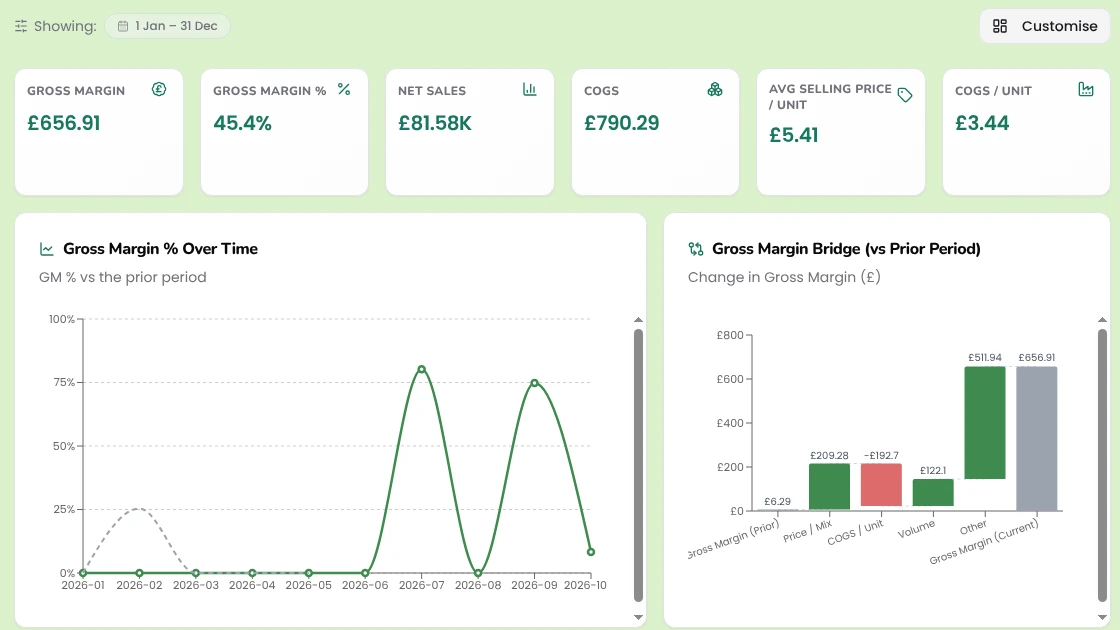
COGS & margins
Invoicing & collections
Analytics & AI agent
MCP & agentic access
How is Pesto built?
Pesto has three layers, and each one makes the layer above it useful.
The system of record
The context layer
Agentic workflows
Generic AI can read a PDF. Only the context layer knows that "GP12" means your 12-jar case of green pesto for that one wholesaler.
What does Pesto connect to?
Accounting


Order channels

Retailer EDI



3PLs and warehouses




Carriers and documents
Don't see yours?
Custom and AI

Who is Pesto built for?
Brands that make their own
Brands that make and use co-packers
Brands that buy finished goods
Running a drinks brand? → Drinks brands
Pesto works best for brands selling to retailers, wholesalers or foodservice as well as direct. → See every integration · → See how customers use it · → Compare Pesto
Weighing up how to bring AI into the business? Start with why your AI strategy is already out of date.
Frequently asked questions
Is Pesto an ERP?
Pesto covers what a food and drink brand needs from an ERP: orders, inventory, batch tracking, recipes, purchasing, invoicing and reporting. It connects to Xero for your accounts rather than replacing them.
Which order formats can Pesto read?
PDF, Excel, CSV, TXT, JPG and PNG files, up to 10 per upload, plus forwarded emails with attachments, pasted email threads, Shopify orders and EDI through your EDI system (e.g. XEDI, TrueCommerce, Supply Lens).
Does Pesto replace Xero?
No. Pesto creates invoices in your accounting software (e.g. Xero, Sage, QuickBooks) from what you dispatched, syncs their status back, sends supplier POs and drafts supplier bills for production costs. Your accounts stay where they are.
Does Pesto work with my 3PL?
Pesto routes orders to your 3PL's system (e.g. Mintsoft, Pimento, Hive), with rules by source, customer type, customer or product. It mirrors stock levels from systems such as Mintsoft and Codestorm, books APC Overnight and flags any failed export so you can resend it.
Can I use Pesto with Claude or ChatGPT?
Yes. The Pesto MCP server lets Claude or ChatGPT read and query your live Pesto data after you log in with your Pesto account, and your data stays scoped to your organisation. Pesto switches it on per organisation.
How long does it take to get set up?
Most brands go live in weeks, not months. We set up your products, customers, price lists and integrations with you.
See Pesto running on your own orders.
Bring a real PO, your messiest one. We'll show you what Pesto does with it in 30 minutes.
Book a demo