
Glossary
What is order normalisation?
Last updated: 16 October 2026
Order normalisation turns customer orders that arrive in different formats into one consistent structure, with the same customer record, depot, product codes, units and prices every time.
A Sainsbury's EDI file, a Booths PDF, a wholesaler's Excel sheet and an email asking for "2 cases of the chilli one" all say the same thing: send this product to this place. Normalisation pulls out the details, maps them to your records, checks them and flags anything odd, so every order looks the same downstream.
Is "order normalisation" a standard term?
People use it loosely. You'll also hear AI order entry, PO to sales order, order data extraction and purchase order processing for the same job. In databases, "normalisation" means something else entirely (structuring tables to avoid duplicate data). Here it means making every incoming order look the same.
In plain English: what does order normalisation look like?
Monday morning at a chilli sauce brand. Four orders land.
| What arrives | What it says | After normalisation |
|---|---|---|
| Sainsbury's EDI file | Sainsbury's own product code, quantity in cases, depot as a GLN | Sainsbury's, named depot, your SKU, 48 cases, agreed price |
| Booths PDF | Booths' item number, cases of 6, a delivery date in the footer | Booths, their depot, your SKU, 20 cases, agreed price |
| Wholesaler's Excel sheet | Your product name, abbreviated, quantity in single bottles | Wholesaler, their warehouse, your SKU, 288 units, their price |
| Independent's email | "2 cases of the chilli one, usual price" | The deli, its shop address, your SKU, 2 cases, its price |
Four formats in. Four identical, clean orders out. Everything after this point (picking, delivery notes, invoices) can treat them the same way.
(Illustrative orders.)
Why does order normalisation matter?
Keying is where errors start.
Everything downstream depends on it.
Prices drift.
Reporting needs one shape.
How does order normalisation work in practice?
Step 1
Extract
Read the PO number, dates, customer, delivery point and every line from the document, whatever its format.
Step 2
Map the customer and depot
Match the sender to your customer record, then match the delivery point, ideally by GLN.
Step 3
Map the product codes
Translate each customer's own product code, or a free-text description, into your SKU.
Step 4
Convert units
Make sure the quantity uses the unit that customer orders in: cases, units or weight.
Step 5
Validate prices
Compare each line with that customer's agreed price and fill any gaps.
Step 6
Flag exceptions for human review
Show a person anything that doesn't match, and let them approve the order.
Step 6 matters more than it looks. AI reads documents well, but it isn't perfect, and a missed order can cost you a listing. A review step shows you what the system got wrong.
Related terms
- What is order management software for food brands?: the full journey from order to invoice, of which normalisation is the first step.
- What is COGS software for food brands?
- All glossary terms
How does Pesto handle order normalisation?
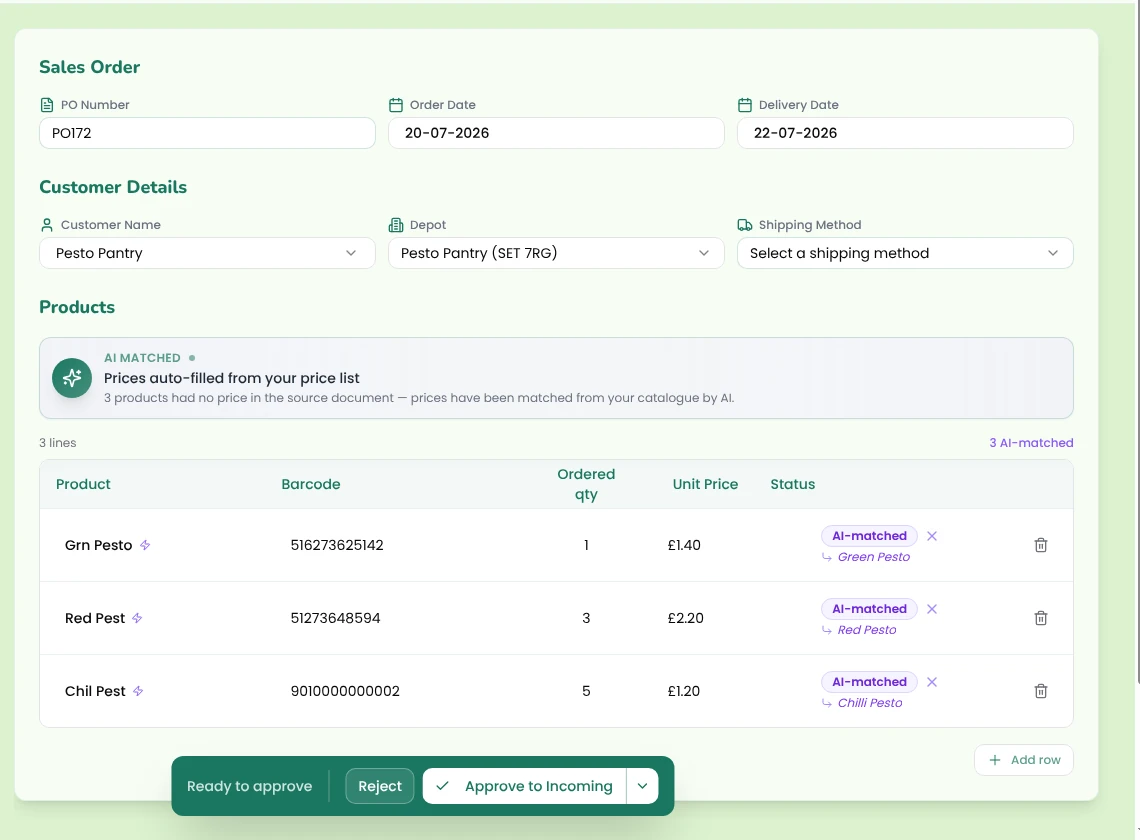
Pesto reads POs from PDF, Excel, CSV, TXT, JPG and PNG files, forwarded emails and pasted email threads, and takes EDI orders through your EDI system (e.g. XEDI, TrueCommerce, Supply Lens). It extracts the PO number, dates, customer, depot, lines, quantities and prices.
Pesto fuzzy-matches the customer, finds the depot by GLN, then postcode, then address, and matches each line by the customer's own product code within that customer's catalogue. For free-text lines, AI proposes the match. Fix a code once and every future order from that customer matches. Pesto knows whether each customer orders in cases, units or weight, fills missing prices from their price list and flags any mismatch as "Expected: £x".
You see the extracted order beside the source document, and Pesto won't let you approve it until the customer, depot and products match. → Order management

Frequently asked questions
Is order normalisation the same as EDI?
No. EDI sends orders as structured data, but only from customers who use it, and still in their codes. Normalisation handles every format, EDI included, and maps it all to your records.
Can AI normalise orders without anyone checking?
It can try, but we don't recommend it. A review queue shows you the mistakes. Fully silent automation hides the order it missed.
What do I need before I can normalise orders?
A clean product list, each customer's product codes for your SKUs, your price lists per customer, and their depot details, ideally with GLNs.
Why not just ask every customer to use one format?
Your buyers set the format, not you. Big retailers won't change their EDI or PO layout for one supplier, so the work of normalising lands on your side.
Is order normalisation the same as AI order entry?
Mostly. "AI order entry" usually describes the extraction step. Normalisation also covers matching, unit conversion and price checks.
See Pesto running on your own orders.
Bring a real PO, your messiest one. We'll show you what Pesto does with it in 30 minutes.
Book a demo