
Integrations
Xero inventory management for food brands: keep Xero, add batches and use-by
Last updated: 16 October 2026
Xero's built-in inventory is built for simple stock: it doesn't track batches, use-by dates or recipes. Pesto runs that side for challenger food and drink brands, then sends Xero what it needs: invoices from the quantity you dispatched, supplier POs and draft supplier bills. Your accounts stay in Xero, and invoice statuses sync back to Pesto.

What does Xero's built-in inventory do?
Xero gives you tracked inventory inside your accounting system. Its UK inventory page says you can "manage up to 4000 finished items". When you buy or sell a tracked item, Xero updates the quantity, and it posts cost of goods sold automatically.
For a brand that buys finished stock, sells it from one place and never needs to know which batch went where, that's enough. Plenty of brands start there, and it works.
What are Xero's inventory limitations for a food brand?
Xero's built-in inventory is built for simple stock: it doesn't track batches, use-by dates or recipes. Xero recommends apps from the Xero App Store for more advanced inventory, including multiple locations and pick and pack.
For a food brand selling to retailers, those gaps show up fast:
batch codes
No use-by dates.
No recipes.
One stock figure.
None of that is a criticism of Xero. It's accounting software, and it's very good at accounting. Stock that goes off needs its own system.
What does Pesto send to Xero?
Pesto runs your orders, stock, batches and production. It sends Xero the financial records that come out of them.
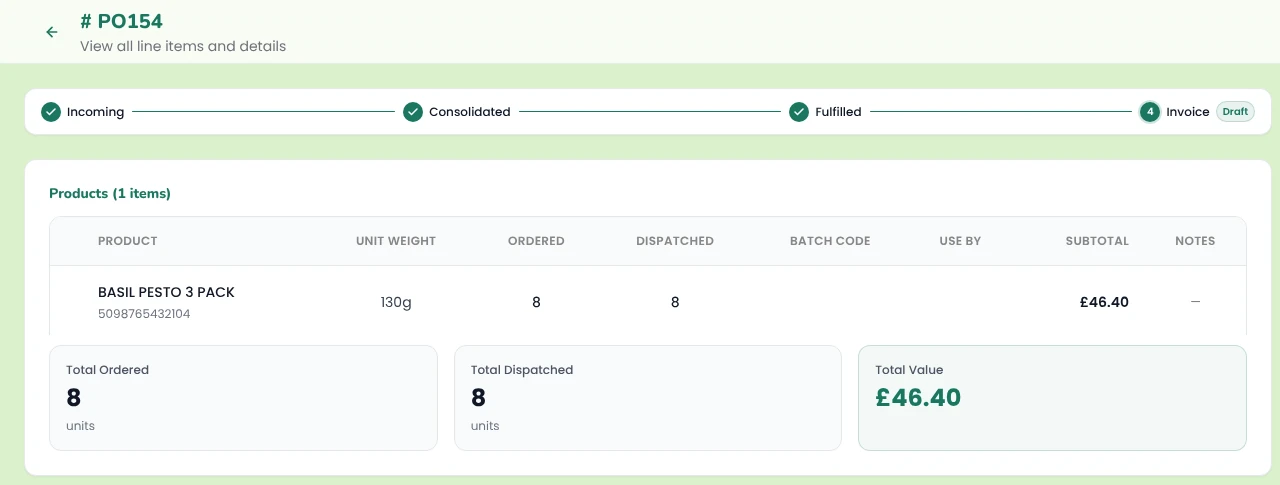
- Invoices from what you dispatched. Pesto builds each Xero invoice from the dispatched quantity multiplied by the order price, so a short delivery never becomes a full invoice. Create them one at a time or in bulk.
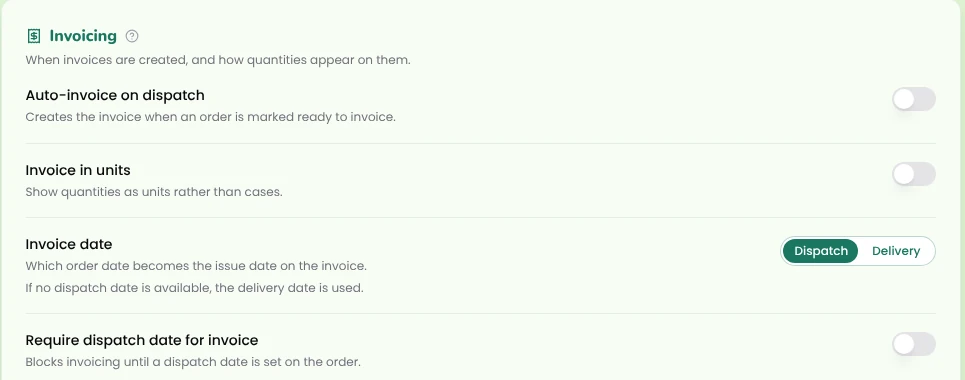
- Auto-invoice on dispatch. Switch it on and Pesto raises the Xero invoice the moment you mark an order dispatched.
- Everything mapped. Each invoice carries the right Xero contact, item code, account and tax rate. Chart of accounts mapping rules decide which account each line posts to.
- Invoice date rules. Date each invoice by dispatch date or delivery date. You can also block invoicing until an order has a dispatch date.
- Units or cases. Invoice in units or cases, whichever your customer expects, and expand assortments into their components.
- VAT handled. Mark VAT-exempt customers in Pesto. Tax rates sync from Xero, so Pesto uses the rates you already run.
- Draft invoices you can still change. Update a draft invoice from Pesto and view the invoice PDF without opening Xero.
- Stock and COGS movements. Each day Pesto sends Xero the stock and cost of goods sold movements behind that day's invoices, at the actual lot cost of what you dispatched, so your accounts move with your stock.
- Supplier POs. Send purchase orders to suppliers through Xero, or as a branded PDF.
- Draft supplier bills from production runs. Record the actual service costs on a production run (labour, co-man fees, logistics) and Pesto drafts the Xero supplier bill for each supplier invoice. → Brands that make and use co-packers
The dispatch note and the invoice now say the same thing, because they come from the same record.
What does Pesto sync back from Xero?
Invoice status.
Overdue customers.
Reminder drafts.
Tax rates.
Customers.
What stays in Xero?
Your accounts. Your ledgers, bank reconciliation, VAT returns and financial reports all stay in Xero, with your accountant working the way they already do.
Pesto works out cost of goods sold at the actual lot cost of the stock on each dispatched line, shows it on the Gross Margin dashboard, and sends the daily stock and COGS movements to Xero so the figures agree. → COGS & margins
How do you set up Pesto with Xero?
Step 1
Connect Xero
Link your Xero organisation to Pesto from your Pesto settings.
Step 2
Bring in your customers
Import them from Xero and check each one matches the right Xero contact.
Step 3
Map your products and accounts
Match each product to its Xero item code and set your chart of accounts mapping rules. Tax rates sync from Xero.
Step 4
Choose your invoice rules
Auto-invoice on dispatch or by hand, dispatch date or delivery date, units or cases.
Step 5
Run a real order
Dispatch one this week, then open the draft invoice in Xero and sense-check it against the delivery note.
Most of the work is the mapping, and you only do it once.
Invoicing & collections
Inventory
Shopify integration
Frequently asked questions
Does Pesto replace Xero?
No. Xero stays your accounting system. Pesto runs orders, stock, batches, production and purchasing, then sends Xero invoices, supplier POs and draft supplier bills.
Can Xero track batches?
Xero's built-in inventory is built for simple stock: it doesn't track batches, use-by dates or recipes, and Xero recommends apps for more advanced inventory. Pesto records every lot with its batch code, supplier, location, received date, use-by and cost per unit.
Does Pesto post COGS to Xero?
Yes. Pesto calculates COGS at actual lot cost, shows it on the Gross Margin dashboard, and sends Xero the stock and COGS movements behind each day's invoices. It also drafts Xero supplier bills for the service costs on each production run.
Does Pesto invoice what the customer ordered or what we dispatched?
What you dispatched. Pesto multiplies the dispatched quantity by the order price, so a short delivery gets a matching invoice and no credit note.
Can Pesto send purchase orders through Xero?
Yes. Send supplier POs through Xero, or as a branded PDF straight from Pesto.
Does Pesto work with Sage or QuickBooks instead?
Yes. Pesto integrates with Xero, QuickBooks and Sage. Tell us which one you run and we connect it during onboarding.
Do I need a Xero inventory app as well as Pesto?
No. Pesto runs your stock, batches and use-by dates, and sends Xero the invoices and bills.
See Pesto running on your own orders.
Bring a real PO, your messiest one. We'll show you what Pesto does with it in 30 minutes.
Book a demoSources
- Xero UK, inventory software page ("manage up to 4000 finished items"; quantity and cost of goods sold updates), accessed October 2026. https://www.xero.com/uk/accounting-software/inventory/
- Xero, warehouse management page (apps from the Xero App Store for multi-location and pick and pack), accessed October 2026. https://www.xero.com/au/accounting-software/erp-software/warehouse-management/
- Xero Central, Track your inventory. https://central.xero.com/0/article/Track-your-inventory