
Product
Food inventory management that knows every batch and use-by
Pesto is food inventory management software with batch tracking built in. It records every lot of stock by batch code, supplier, location, received date, use-by and cost. It allocates orders by FEFO or FIFO, applies minimum shelf-life rules per customer, and traces any finished lot back to its production run and material lots, then forward to every order and customer that received it.

What problem does this solve?
Your biggest customer accepts nothing with less than 60 days of shelf life. Your 3PL picks the batch at the front of the rack, which has 41 days left. The depot rejects the delivery, the buyer logs a service failure and you eat the cost of the stock.
Then a supplier tells you a batch of an ingredient is under investigation. You need to know which finished lots used it and which customers received them, by this afternoon.
Both of those land on the same person, usually on a Friday. Pesto puts the answer one search away.
How does Pesto track batches and expiry dates?
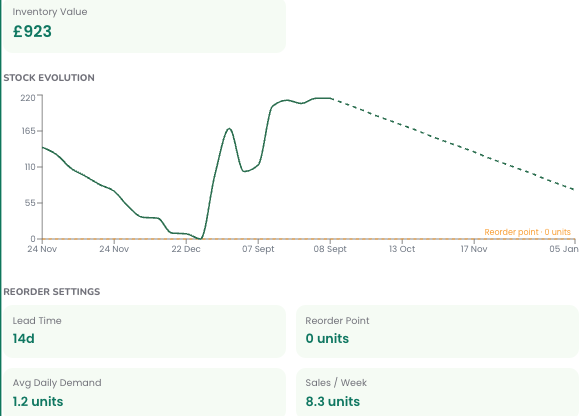
Every unit of stock in Pesto belongs to a lot. Each lot carries its batch code, supplier, location, received date, use-by and cost per unit.
Shelf life at a glance.
No batch, no dispatch.
A full lot ledger.
That's the record your retailer's technical team expects you to have.
How does FEFO allocation work in Pesto?
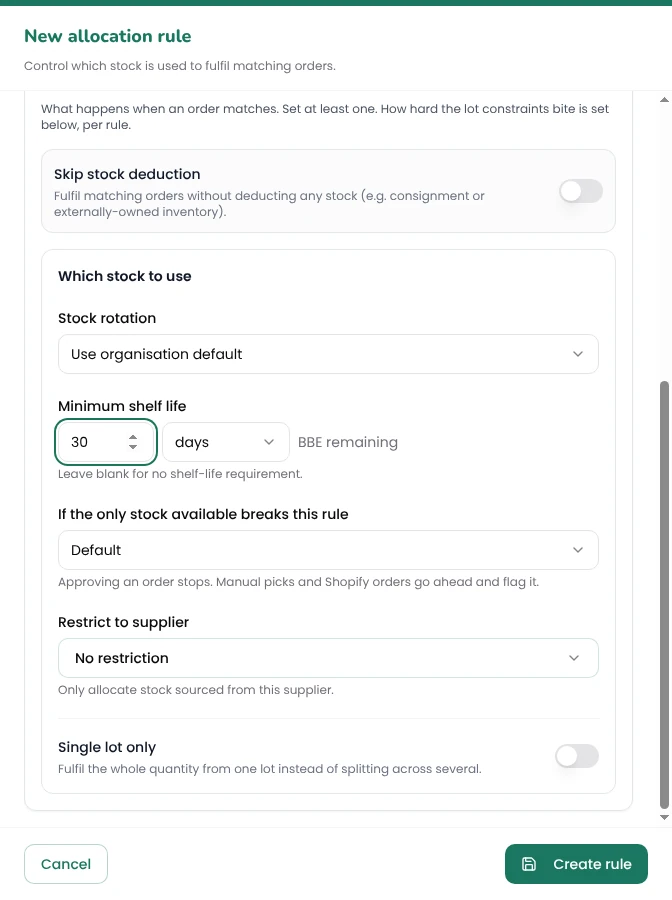
FEFO means first expired, first out: Pesto allocates the lot with the earliest use-by first. Choose FEFO or FIFO (first in, first out) for your organisation, then layer allocation rules on top.
Set rules by order source, customer type, customer or product:
Minimum shelf life.
Single supplier.
Single lot.
When you pick an order, Pesto pre-selects the lots that follow these rules, and you can still split a line across lots by hand. So the 60-day customer gets the 90-day batch, and the 41-day batch goes to the wholesaler who's happy to take it. → Order management
How does stock get into Pesto?
Book stock in by hand, or upload whatever the delivery came with: a delivery note, a spreadsheet, a PDF or a photo of the paperwork. Pesto's AI reads the document and pre-fills the lots for you to check.
If your stock lives in a 3PL's warehouse system, Pesto mirrors it in. Stock levels from systems such as Mintsoft and Codestorm mirror into Pesto, and Pesto resyncs with others such as Pimento. You see one stock figure, not three.
When the count doesn't match, record an adjustment with a reason: recount, damaged, write-off or received short. Every adjustment lands in the lot ledger, so you can see why stock moved as well as when.
Optionally, upload any warehouse dispatch report and Pesto reconciles it against what you sent.
How does Pesto handle stock across several locations?
Add as many locations as you run: your own unit, one or more 3PLs, a co-packer's site. Assign customers to the location that serves them, and Pesto allocates their orders from there.
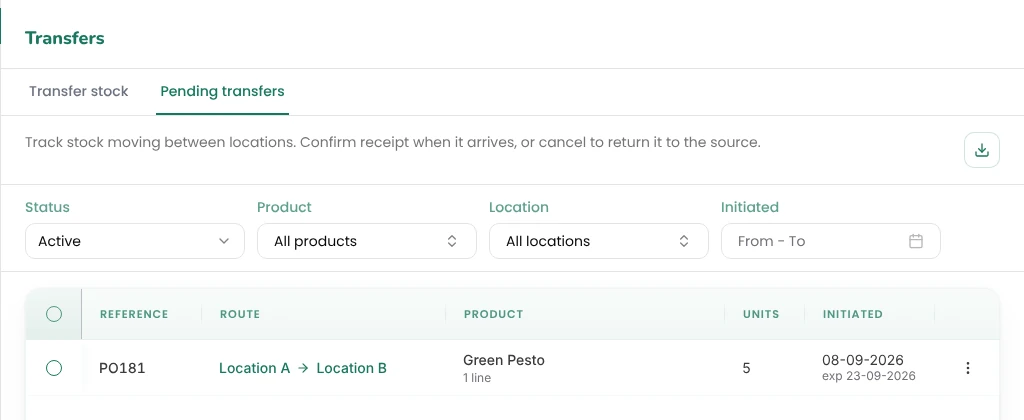
Moving stock between sites? Create a transfer and Pesto tracks it in transit. If less arrives than left, record a shortage reason on the transfer. For simple moves, a quick transfer does it in one step.
If a co-packer makes some of your range, Pesto reserves and depletes the materials you supply at the co-packer's location. Knowing what's sitting in someone else's factory is the core of a co-packer ERP.
Can Pesto trace a batch for a recall?
Yes. Pesto traces a finished lot back to the production run that made it, the material lots that went into that run and the suppliers who sent them. It then traces forward to every order and customer that received the finished lot.
That's a trace you can run at your desk in minutes, not by walking the racks. → Traceability & recall, including mock recalls
Production runs and kitting sit behind this trail. A production run records what you made, where you made it and which material lots it used. Kitting builds assortments and gift packs from component lots. Both feed straight into costing. → COGS & margins
How do you know what's about to go wrong?
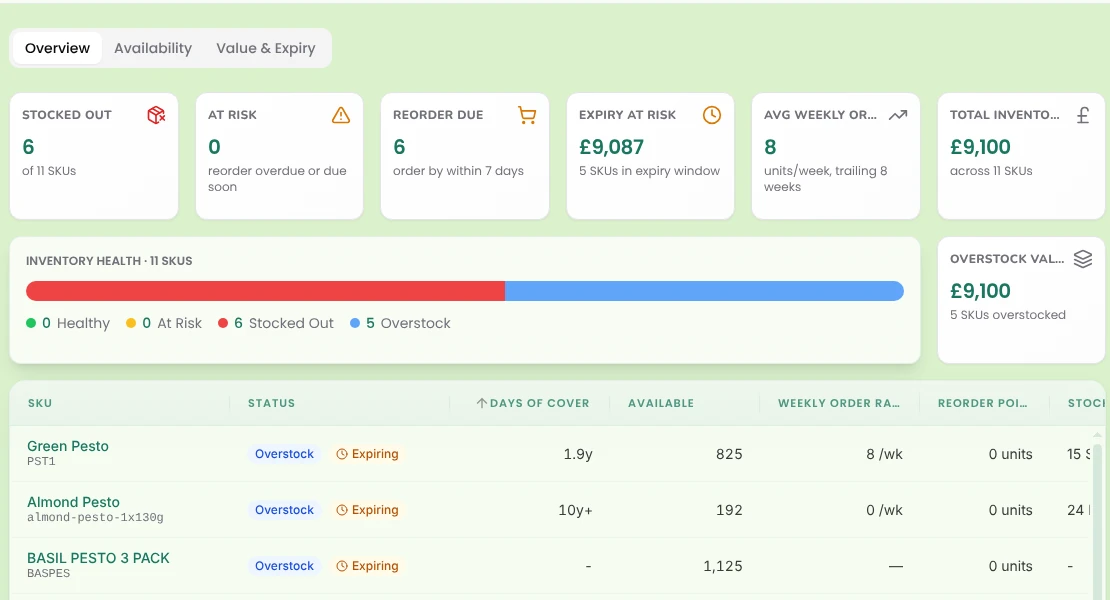
The Stock Health dashboard shows you the stock problems coming before they arrive:
Stocked out
Reorder due
Expiry at risk
Stock value
Days of cover
Monday's stock meeting gets shorter.
What do founders say?

"It's so intuitive that without my operational experience, without massive supply chain experience, we're now running a supply chain very effectively."
Founder, Seed Revolution
Order management
COGS & margins
Brands that make their own
Frequently asked questions
What is FEFO?
FEFO stands for first expired, first out. Pesto allocates the lot with the earliest use-by date first, so short-dated stock leaves before longer-dated stock and less of it goes to waste.
What's the difference between FEFO and FIFO?
FIFO (first in, first out) allocates the stock you received first. FEFO allocates the stock that expires first. Pesto supports both, and you choose which one your organisation runs.
Can I set different shelf-life rules for different customers?
Yes. Set a minimum shelf life by customer, customer type, order source or product, and choose whether Pesto allows, warns or blocks when a lot falls short.
Can Pesto help with a product recall?
Yes. Pesto traces any finished lot back to its production run, material lots and suppliers, and forward to every order and customer that received it. You can export the lot ledger to CSV.
Does Pesto work with my 3PL's stock levels?
Yes. Pesto mirrors stock in from your 3PL's system (e.g. Mintsoft, Codestorm) and resyncs with others such as Pimento, so your stock figures match your warehouse.
Do I have to type stock in by hand?
No. Upload the delivery note, a spreadsheet, a PDF or a photo, and Pesto's AI pre-fills the lots for you to check and confirm.
See Pesto running on your own orders.
Bring a real PO, your messiest one. We'll show you what Pesto does with it in 30 minutes.
Book a demo