
Product
Connect Claude or ChatGPT to your live orders, invoices and sales.
Pesto's MCP server lets Claude, ChatGPT and other MCP-compatible clients query your live Pesto data in plain English. Ask about pending orders, paid invoices, sales and customers, then combine the answers with your Xero or email connectors in the same chat. You log in with your Pesto account, and every query stays scoped to your organisation.
What problem does this solve?
Your finance lead wants to know which customers paid in September. Your co-founder wants to know the best sales month this year and why. Right now, someone exports from Pesto, exports from Xero and stitches the two together in a spreadsheet.
AI assistants are good at that stitching. They just need a safe way to reach your data, one that knows who you are and what you're allowed to see.
Pesto's MCP server is that way in.
What is MCP, in plain English?
MCP (Model Context Protocol) is a standard way for AI assistants like Claude and ChatGPT to talk to your systems. Think of it as a plug socket. Any assistant that supports MCP can plug into any system that offers an MCP server, without someone writing a custom integration for each pair.
Pesto's MCP server is the socket for your Pesto data. Connect it to Claude or ChatGPT once, and your assistant can look up your orders, invoices, sales and customers whenever you ask a question that needs them.
You don't need to write code or learn a query language. You type a question, and Claude or ChatGPT asks Pesto.
What can you do with Pesto's MCP server today?
Ask questions about your live data, in your own words:
- "Which orders are still pending, and for which customers?"
- "Which invoices were paid last week?"
- "What was our best sales month this year, and what drove it?"
Then go further by combining Pesto with the other connectors you use in Claude or ChatGPT. Add your Xero connector and ask how paid invoices in Pesto line up with your Xero figures. Add your email connector and pull the customer correspondence behind an order into the same conversation.
How do you connect Claude or ChatGPT to Pesto?
Step 1
Add Pesto as a custom connector in Claude or ChatGPT
Pesto isn't in either connector directory yet, so you add it by hand. We'll walk you through it.
Step 2
Log in with your Pesto account
Your assistant sends you to Pesto's login page. Once you sign in, it can query your organisation's data.
That's the whole set-up.
Why does a clean system of record matter before you add AI agents?
AI agents running on messy data are just expensive chaos.
An agent that reads six spreadsheets in different formats, with three versions of the same customer and four names for the same product, gives you confident wrong answers faster. The clean data has to come first.
That's why Pesto works in three layers:
A system of record.
A context layer.
Agentic workflows.
Agents are only as good as the first two layers. Pesto gives them a foundation worth building on. → Analytics & AI agent
Can you connect other tools without MCP?
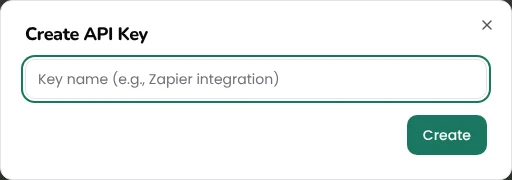
Yes. Pesto issues API keys for custom integrations, so you can connect tools like Zapier to your Pesto data. Generate the keys in your Pesto settings.

How fast does Pesto ship?

"Anytime we have an issue, Pesto are very quick to act on it. They'll acknowledge it, look into it, get back to you quickly, and within a couple of hours they've often rolled out an update that solves the problem."
Senior Operations Executive, Punchy Drinks
Analytics & AI agent
Order management
Brands that buy finished goods
Working out where AI fits first? Read the four mistakes in nearly every food and drink business.
Frequently asked questions
What is an MCP server?
An MCP server lets AI assistants like Claude and ChatGPT connect to a system and use its data. Pesto's MCP server lets them query your live orders, invoices, sales and customers in plain English.
Which AI assistants work with Pesto's MCP server?
Claude and ChatGPT, where you add Pesto as a custom connector. Other MCP-compatible clients use the same standard, and we'll confirm each one once we've verified it.
Can Claude or ChatGPT change data in Pesto?
Not today. Pesto's MCP access is read-only. When we add write actions, they'll come with a human confirmation step.
Is Pesto in the Claude or ChatGPT connector directory?
Not yet. You add Pesto as a custom connector in Claude or ChatGPT, and we'll walk you through the steps.
How do I get MCP access?
It's included with Pesto. Add Pesto as a custom connector in Claude or ChatGPT, log in with your Pesto account and start asking questions. If you'd like a hand, request MCP access through our demo form.
Can I connect Claude or ChatGPT to my inventory and orders?
Yes for orders, invoices, sales and customers, which you can query today.
Want your AI assistant to know your operations?
Tell us what you'd ask Claude or ChatGPT about your orders and invoices. We'll help you connect.
Request MCP accessSee Pesto running on your own orders.
Bring a real PO, your messiest one. We'll show you what Pesto does with it in 30 minutes.
Book a demo