
Product
Invoice on dispatch. Spot overdue customers before you ship again.
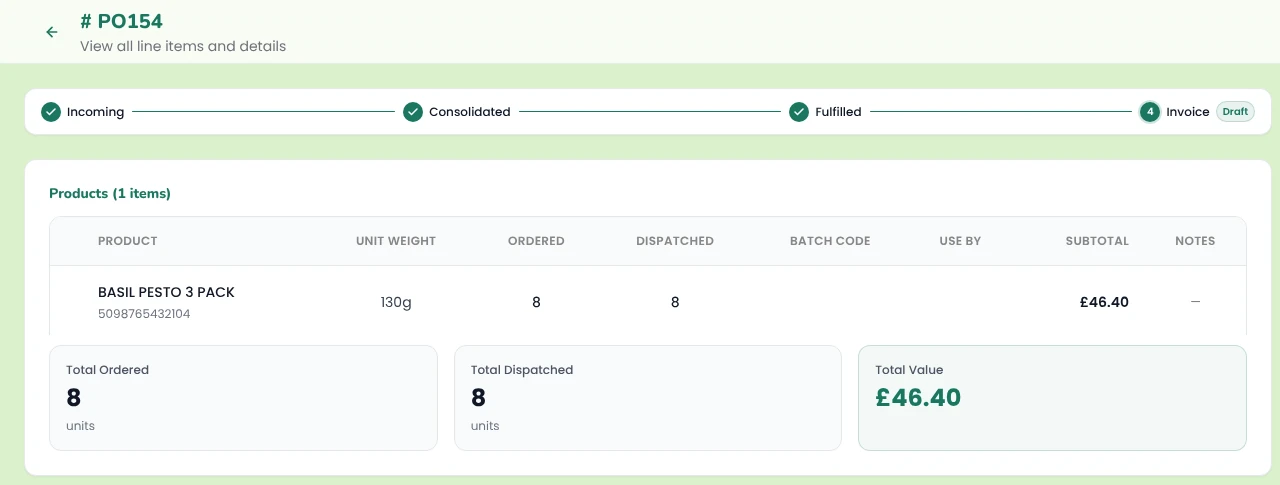
Pesto creates invoices in your accounting software (Xero, QuickBooks or Sage) from the quantity you actually dispatched, multiplied by the price on the order, with contact, item code, account and tax already mapped. Switch on auto-invoice and every dispatch raises its own invoice. Pesto syncs each invoice's status back from your accounting software and flags overdue customers before you ship them more.

What problem does this solve?
It's Friday afternoon. You're checking dispatch notes against orders, retyping invoices into your accounting software, then scrolling the aged debtors report to work out who to chase.
The Sainsbury's order went out two cases short, so that invoice needs changing before it goes. An independent who's 45 days overdue placed another order on Tuesday, and your team approved it because nobody told them. And you'll write the chaser emails one by one, after everyone else has gone home.
Invoicing isn't hard. It's just relentless. Pesto takes the retyping out of it and puts the overdue customers in front of you.
How does Pesto create invoices in your accounting software?
Pesto builds each invoice from the dispatched quantity multiplied by the order price. If the order went out two cases short, the invoice says so. Your buyer gets an invoice that matches what arrived at the depot, and you avoid the credit note.
Pesto maps every invoice to the right contact, item code, account and tax rate in Xero, QuickBooks or Sage, using your chart of accounts mapping rules. Create invoices one at a time or in bulk.
Or skip the button altogether. Switch on auto-invoice and Pesto raises the invoice the moment you mark an order as dispatched.
That's the last step of order management for a food brand: from PO in, to invoice out, without anyone retyping a line. → Order management
Which date goes on the invoice?
You choose. Pesto dates each invoice on either the dispatch date or the delivery date, whichever your customer's terms run from.
If you want to be strict about it, switch on a rule that stops anyone invoicing an order until it has a dispatch date. No more invoices going out for orders that haven't left the building.
Can Pesto invoice in cases when you sell in units?
Yes. Set each customer to invoice in units or cases, so the invoice speaks the same language as their PO.
- Assortments. Expand a mixed case into its component products on the invoice, or keep it as one line.
- VAT. Mark VAT-exempt customers in Pesto. Tax rates sync from your accounting software, so Pesto applies the rates you already use.
Cases vs units sounds trivial, until a buyer queries an invoice for 12 times the quantity they ordered.
What happens when an order changes after you've invoiced it?
Update the draft invoice from Pesto and view the invoice PDF without opening your accounting software.
Pesto syncs every invoice's status back from your accounting software: Draft, Authorised, Paid, Voided or Overdue. You see where each order stands, from PO to payment, on the order itself.
How does Pesto help you chase overdue invoices?
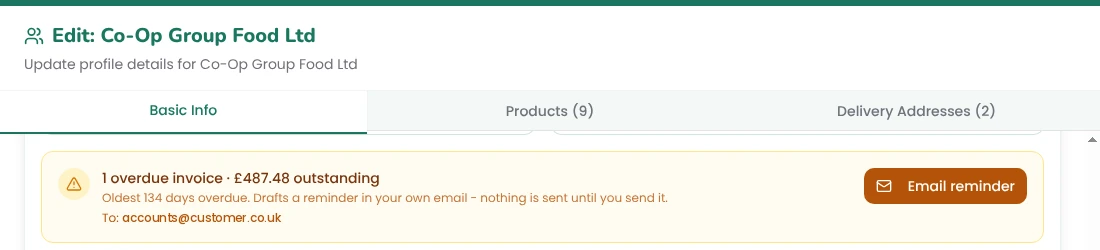
Pesto puts overdue payments where you'll see them:
On the customer card.
On every new order.
In your inbox.
Friday's chasing takes a few clicks, and the emails still come from you.
Erbe, our AI assistant, can also draft a payment chaser from your overdue invoices. → Analytics & AI agent
Which accounting software does Pesto work with?
Xero, QuickBooks and Sage. Tell us which one you run and we connect it during onboarding, so invoices, contacts, item codes and tax rates stay in step with your accounts.
What do customers say?

"I've saved at least an hour a day, and if you take into account the Xero integration for draft invoices, that's definitely saved another hour at the end of my day."
Senior Operations Executive, Punchy Drinks
Order management
Analytics & AI agent
Brands that buy finished goods
Frequently asked questions
Can my accounting software handle inventory for a food brand?
Xero, QuickBooks and Sage track quantities and average cost for simple stock, but none of them tracks batches, use-by dates or recipes. Most food brands keep their accounting software for the accounts and run stock in an operations system that feeds it. Pesto does that job and invoices into your accounting software. → Inventory
Does Pesto integrate with Xero, QuickBooks and Sage?
Yes. Pesto creates invoices in your accounting software with the contact, item code, account and tax rate mapped, syncs invoice statuses back and syncs your tax rates. It can also send supplier POs and draft supplier bills.
Can Pesto invoice automatically when an order ships?
Yes. Switch on auto-invoice and Pesto raises the invoice when you dispatch the order. You can also block invoicing until an order has a dispatch date.
Does Pesto invoice what the customer ordered or what you dispatched?
What you dispatched. Pesto multiplies the dispatched quantity by the order price, so short deliveries don't turn into credit notes.
Does Pesto send payment reminders for me?
Pesto drafts the reminder in your own inbox with one click. Nothing sends until you send it, so every chaser goes out in your words and under your name.
Can Pesto invoice in cases instead of units?
Yes. Set each customer to invoice in units or cases, and choose whether assortments expand into their component products.
Does Pesto support VAT-exempt customers?
Yes. Mark a customer as VAT-exempt in Pesto. Pesto uses the tax rates synced from your accounting software for everyone else.
Which accounting software does Pesto work with?
Xero, QuickBooks and Sage. Tell us which one you run and we connect it during onboarding.
See Pesto running on your own orders.
Bring a real PO, your messiest one. We'll show you what Pesto does with it in 30 minutes.
Book a demo