
Solutions
Order management and inventory for food brands that buy in finished goods
Pesto is order management and inventory software for food and drink brands that buy finished product from a manufacturer and sell through retailers, wholesalers, distributors and D2C. It reads every PO in any format, matches your customers' own codes and prices, routes each order to the right 3PL, plans supplier orders around long lead times and invoices in Xero.

Sound familiar?
- Ocado comes by EDI, Co-op sends a PDF, the wholesaler emails a spreadsheet and an indie sends a photo of a handwritten order.
- Every retailer has its own code for our product. We keep a lookup table and pray.
- We use two 3PLs, and someone decides by hand which one gets each order.
- Our manufacturer needs three months' notice. We found out we'd run short in week ten.
- Marketing sent out a box of samples from stock we'd already promised to a retailer.
- Invoices go out on Friday night, if someone remembers.
- Half my inbox is 'where's my parcel?'
None of this is the work you started a brand to do. It's the work that keeps the listings, though.
How does Pesto run a finished-goods brand?
Here's a normal week for a brand selling a drinks range into retailers, wholesale and Shopify, with two 3PLs and one manufacturer.
Monday
Orders in
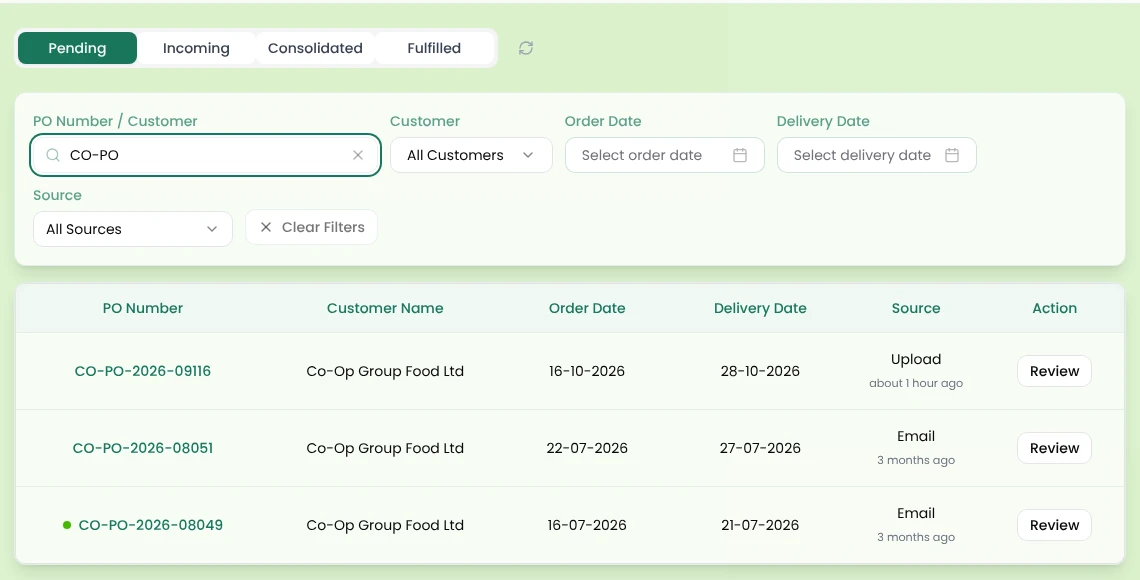
Forward the weekend's order emails to your Pesto inbox, or drop up to ten PDFs in at once. EDI orders from Ocado and other retailers arrive through your EDI system (e.g. TrueCommerce, Supply Lens, XEDI). Shopify orders flow in too. Pesto reads each order, finds the depot by GLN, matches every line to that customer's own product code and flags any price that doesn't match the agreed one.
Tuesday
Approve and route
Check each order beside the original document and approve it. Pesto allocates stock, picks the right lots by FEFO and generates delivery notes with batch codes and use-by dates. Routing rules send retailer orders to one 3PL and Shopify orders to the other. If an export fails, Pesto flags it with a resend button.
Wednesday
Samples and send-outs
Marketing books a press send-out through the send-out form, which shows live stock and respects your stock rules. The retailer's stock stays where it should.
Thursday
Plan the next supplier order
Stock Health shows each SKU's stockout-by and order-by dates. Stock Forecast, working from the sales forecast you uploaded, suggests an order rounded to the case pack and MOQ, and shows why it chose that number. You pack the order into pallets and a truck, and raise the PO to your manufacturer.
Friday
Invoice and chase
Pesto raised each Xero invoice as the order dispatched, from what actually shipped. Customers with overdue invoices show a "PAYMENT OVERDUE" tag, and Pesto drafts a reminder in your own inbox for you to send.
Friday night is free again.
How does Pesto handle POs in every format?
Pesto reads PDF, Excel, CSV, TXT, JPG and PNG files, forwarded emails with attachments, pasted email threads, EDI and Shopify. It pulls out the PO number, dates, customer, depot, lines, quantities and prices, and spots duplicate files by their content.
Then it does the bit that actually takes the time. Pesto matches each line to your customer's own product code within that customer's catalogue, so Sainsbury's code and Ocado's code for the same jar both land on the right SKU. Fix a code once and every future order matches. Pesto fills missing prices from the customer's price list and flags any mismatch with "Expected: £x". It warns, it never blocks.
Each customer orders in cases, units or weight, whichever they use. This is what we call order normalisation.
How does Pesto work with more than one 3PL?
Routing rules decide where each order goes, by source, customer type, customer or product. Pesto sends orders to your 3PL's system (e.g. Mintsoft, Pimento, Hive), and connects to APC Overnight as a carrier. Delivery notes come out as PDF or CSV, with a consolidated CSV for 3PLs that take bulk uploads.
Stock from your 3PL's system (e.g. Mintsoft, Codestorm) mirrors into Pesto, and you can upload any warehouse dispatch report to reconcile what actually left. Multiple locations, in-transit transfers and customer-to-location assignments mean each 3PL's stock stays separate and visible.
How does Pesto plan around long supplier lead times?
Supplier terms hold pack size, price, lead time, MOQ and quantity per pallet for each product. The Stock Health dashboard shows what's stocked out, at risk, due to reorder and at risk of expiring, with days of cover and order-by dates.
Upload a sales forecast and Stock Forecast works week by week per SKU and location, flags each line as Reorder now, At risk, Overstock or Healthy, and lets you choose a Lean, Balanced or Safe posture. Pesto logs every decision you make. When you're ready to buy, demand planning packs the order into pallets and trucks and drafts the PO.
How does Pesto handle invoicing?
Pesto creates Xero invoices from dispatched quantity times order price, one at a time or in bulk, and can raise them automatically on dispatch. You choose whether the invoice date is the dispatch or delivery date, and whether to invoice in units or cases.
Invoice statuses sync back from Xero. Customers who owe you money show an overdue banner on their next order, so you decide before you ship more.
What do brands like yours say?

"Since it's been in Pesto, our issues and errors have dropped to negligible quantities. I couldn't point to a single problem we've had with an order yet."
Founder, Seed Revolution
Frequently asked questions
Does Pesto replace my 3PL's warehouse system?
No. Pesto sends orders to your 3PL's system (e.g. Mintsoft, Pimento, Hive) and mirrors stock back from systems such as Mintsoft and Codestorm. Your 3PL keeps picking and packing; Pesto keeps the orders, stock picture and invoices in one place.
Can Pesto handle more than one 3PL?
Yes. Routing rules send each order to the right 3PL by source, customer type, customer or product.
Does Pesto handle retailer EDI?
Yes. Pesto connects to your retailer's EDI system, for example TrueCommerce, Supply Lens or XEDI, which carry orders from Ocado, Sainsbury's, Booths and other UK retailers.
Can my wholesale customers order directly?
Yes. Pesto's B2B ordering portal is passcode-protected and branded, and each buyer sees their own catalogue and prices, with your minimum order value, shipping rules and terms.
How does Pesto handle samples?
The send-out form lets your team book samples, marketing and influencer send-outs against live stock, with your stock rules applied. There's also a sample request portal for customers.
Do I need to manufacture anything to use Pesto?
No. Pesto works for brands that buy in all their product finished. If you start making some lines yourself or with a co-packer later, the same system handles it. → Brand and co-packer hybrid
How long does it take to get set up?
Most brands go live in weeks, not months. We set up your products, customers, price lists, 3PLs and EDI with you.
See Pesto running on your own orders.
Bring a real PO, your messiest one. We'll show you what Pesto does with it in 30 minutes.
Book a demo