
Product
Demand planning and purchase orders that end in a full truck
Pesto turns customer demand into supplier purchase orders. It works through your bills of materials to calculate what you need, splits that across suppliers in whole pallets, packs the pallets into trucks and drafts a PO for each supplier in their own pack sizes, with MOQ warnings. You send the POs through Xero or as a branded PDF.

What problem does this solve?
Your oat supplier sells in 5 kg cases, 168 cases to a pallet, with a 200-case MOQ. Your spreadsheet says you need 4,200 kg across two production sites. Someone converts kilos to cases, forgets the second site, and the truck turns up half-empty. You pay the haulage on a full one anyway.
Multiply that by every material and every supplier, and supplier ordering eats a week of someone's month. It's the unglamorous stuff, and it decides your margin before a single case ships.
How does Pesto turn demand into material needs?
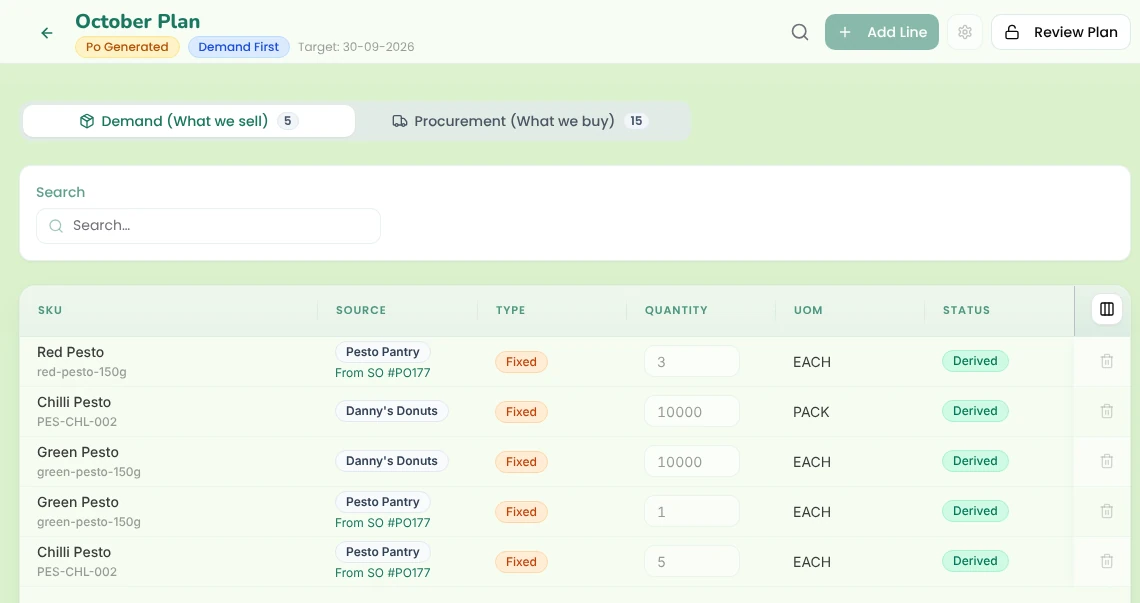
Start a planning cycle. Choose Demand First or Procurement First, depending on whether you plan from what customers need or from what you're buying.
Bring in demand three ways:
From sales orders
By hand
By uploading a SKU list
Pesto then works through each product's bill of materials (BOM) and turns finished-goods demand into material needs per destination. If two products share an ingredient or a box, Pesto consolidates the need into one line, so you order it once.
How does Pesto split orders across suppliers?
Tell Pesto what share each supplier should get, say 70% to one and 30% to another, and it splits the need in whole pallets. No half-pallets, no rounding by hand.
Pesto takes the numbers from each supplier's terms, which you set once:
- Pack size and price
- Lead time
- Minimum order quantity (MOQ)
- Quantity per pallet
The Supplier Allocation dashboard later shows you how the actual split compares with your target. → Analytics & AI agent
How does Pesto fill a truck?
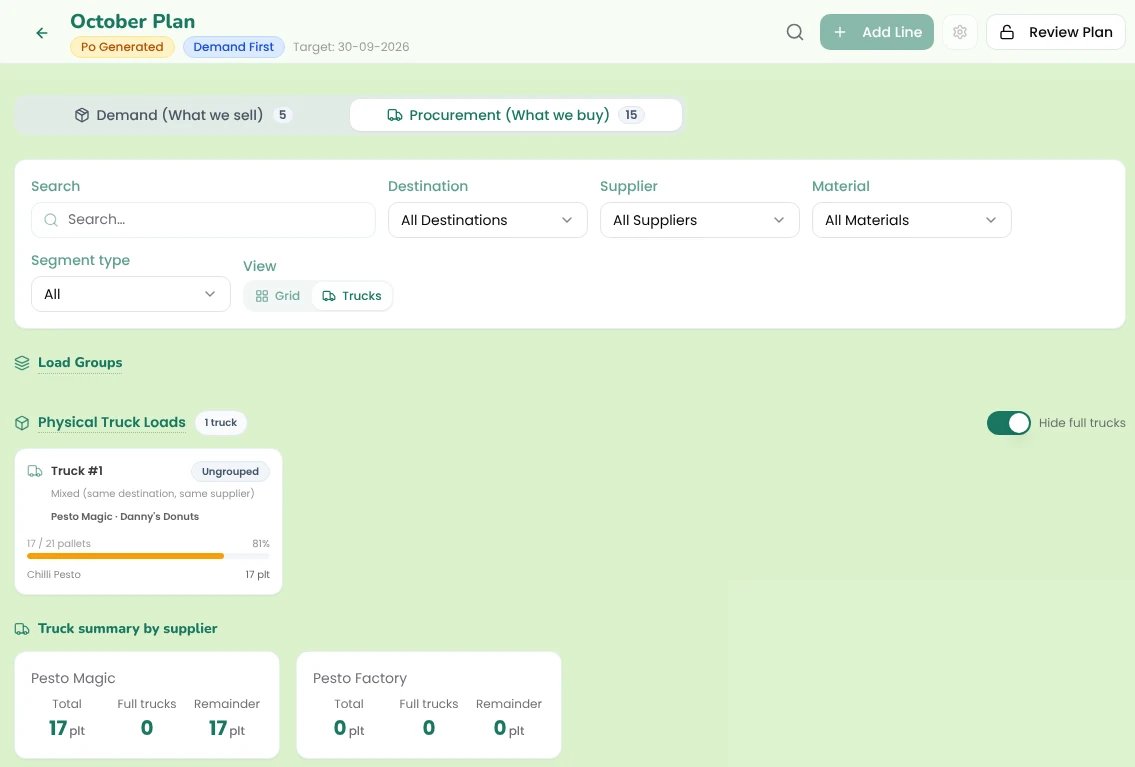
Pesto calculates pallets from each supplier's quantity per pallet, then packs them into trucks. You configure the truck: 26 pallets, for example.
Pesto handles full loads, mixed loads, milk runs and multi-supplier loads. If a truck has space left, press "Fill truck" and Pesto fills it.
A full truck costs the same as a half-empty one. Pesto makes sure you're paying for the full one.
How does Pesto raise the supplier POs?
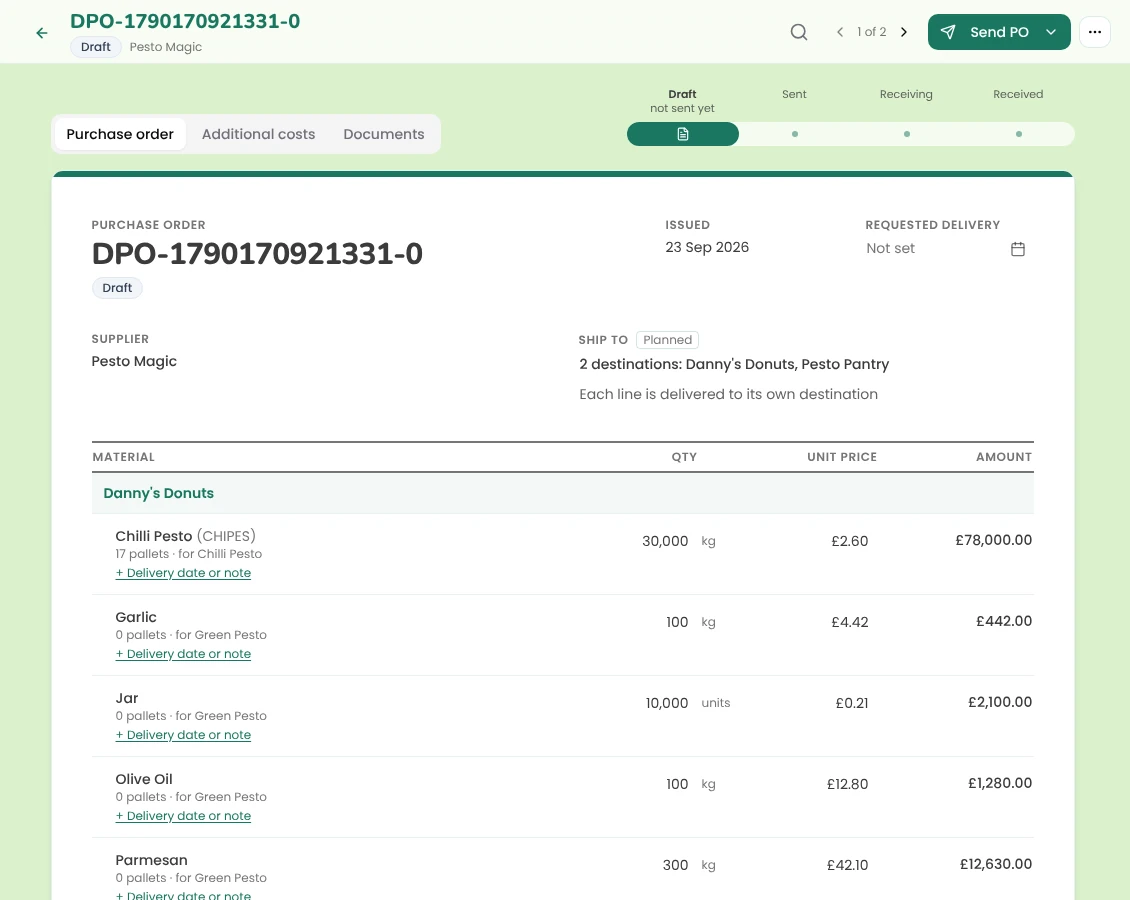
Validate the plan, lock it, and Pesto generates draft POs per supplier, per truck or per material.
Pesto converts your base units into the supplier's pack. If you need 4,200 kg and the supplier sells 5 kg cases, the PO says 840 cases of 5 kg. Your supplier reads their own units, and nobody does the maths on a calculator.
Outside a planning cycle, you can raise a PO by hand. Pesto warns you when a line falls below the supplier's MOQ. If you'd rather, switch on an option to draft POs straight from sales orders.
Add haulage, duty and other costs to each PO, then send it through Xero or as a branded PDF.
What happens when the delivery arrives?
Receiving and booking stock in are two separate steps, on purpose.
Step 1
Receive the lines
Record what arrived against the PO, line by line.
Step 2
Book the stock in as lots
Add batch codes, use-by dates and costs. Upload the supplier's delivery note and Pesto's AI reads it and pre-fills the lots.
Stock enters Pesto when you book it in, with the batch details that FEFO and traceability depend on. → Inventory
Can Pesto link a customer order to a supplier PO?
Yes. If you buy to order, or a co-man makes a run for a specific customer order, link the customer's sales order to the supplier PO. Pesto's AI suggests the matches.
You see which supplier PO covers which customer order, which helps when a supplier delivery slips and you need to warn the right buyer. That link is a big part of what makes a co-packer ERP work.
How does Stock Forecast help you decide when to reorder, including for seasonal peaks?
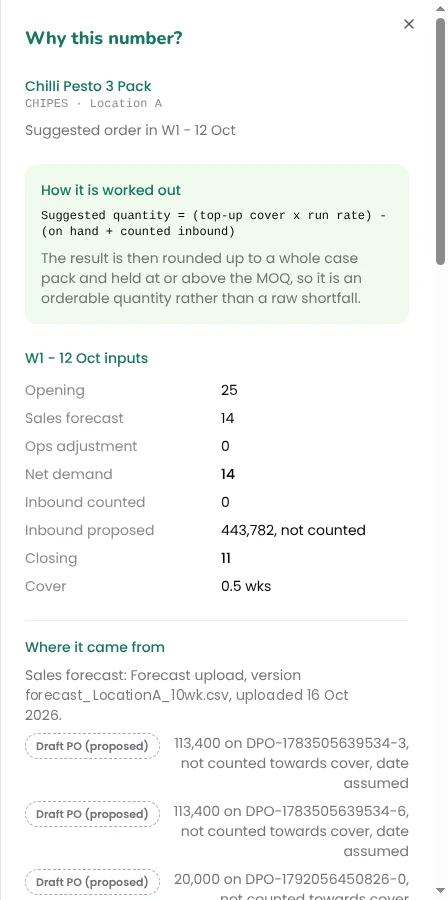
Upload your sales forecast and Stock Forecast projects stock week by week, for every SKU at every location. Each line gets a status: Reorder now, At risk, Overstock or Healthy.
Choose your posture (Lean, Balanced or Safe) and Pesto suggests an order quantity rounded to the case pack and MOQ. Click "Why this number?" to see how Pesto got there.
When you accept or reject a suggestion, Pesto logs the decision. It doesn't raise the PO for you. You decide, Pesto records it, and you raise the PO when you're ready.
What do customers say?
- A week a month to a day spent on supplier order optimisation at Bold Bean Co
New to planning terms? Read what MRP is and how safety stock works.
Inventory
COGS & margins
Brands that make and use co-packers
Frequently asked questions
What is demand planning software for food brands?
Demand planning software turns what your customers will order into what you need to buy. Pesto takes demand from sales orders, manual entry or an uploaded SKU list, works through your BOMs, and produces supplier POs packed into pallets and trucks.
Does Pesto create purchase orders automatically?
Pesto drafts POs from a locked planning cycle, per supplier, truck or material. You review the drafts and send them. Stock Forecast suggestions work differently: accepting one logs your decision and leaves raising the PO to you.
Can Pesto handle supplier MOQs and pack sizes?
Yes. Pesto stores each supplier's pack size, price, lead time, MOQ and quantity per pallet. It converts your base units into supplier packs and warns you when a PO line falls below the MOQ.
Does receiving a supplier delivery update my stock?
Receiving records what arrived against the PO. You then book the stock in as lots, with batch codes and use-by dates, and that step adds it to stock. Pesto's AI can read the delivery note to pre-fill the lots.
Does Pesto forecast my sales?
Stock Forecast works from a sales forecast you upload. Pesto projects stock against that forecast week by week and suggests order quantities rounded to case pack and MOQ.
Can I send POs through Xero?
Yes. Send each PO through Xero, or as a branded PDF. You can also add haulage, duty and other costs to a PO.
See Pesto running on your own orders.
Bring a real PO, your messiest one. We'll show you what Pesto does with it in 30 minutes.
Book a demo