
Glossary
What is order management software for food brands?
Last updated: 16 October 2026
Order management software for food brands carries each customer order from the moment it arrives to dispatch and invoice, and handles the details food brings with it: cases and units, retailer depots, batch codes and use-by dates.
It captures orders from PDFs, emails, EDI, Shopify and B2B portals, matches them to each customer's product codes and prices, allocates stock by batch and shelf life, produces delivery notes, sends the order to your 3PL and raises the invoice. You get one order record from PO to payment, with nobody retyping it.
In plain English: what does order management software do?
It's Tuesday morning at a kombucha brand. An Ocado order arrives by EDI. A Booths order arrives as a PDF. A deli in Leeds emails: "Same as last time, but add a case of the ginger."
Three customers, three formats, three sets of product codes. Order management software turns them into clean orders with the right customer, depot, products and prices. It picks the oldest ginger batch with enough shelf life for each customer, prints delivery notes with batch codes and use-by dates, sends the orders to the 3PL and raises Xero invoices once the cases leave.
The founder's Tuesday night is free.
Why does order management matter more for food brands?
Generic order management tools assume one product, one price and one unit. Food breaks all three.
Cases vs units.
Depots and GLNs.
Use-by and minimum shelf life.
Retailer formats.
Customer product codes.
Batch codes on paperwork.
How does it work in practice?
Step 1
Capture
The order arrives by PDF, email, EDI, Shopify or portal, and the software extracts the PO number, dates, customer, depot and lines.
Step 2
Match
It maps the customer, the depot and each line to your records, using the customer's own product codes. People often call this step order normalisation.
Step 3
Check prices
It compares each price with that customer's agreed price and flags any gaps.
Step 4
Allocate
It reserves stock by batch, applying FEFO or FIFO and each customer's shelf-life rules.
Step 5
Produce the delivery note
It adds batch codes and use-by dates.
Step 6
Send to the 3PL
It passes the order to your warehouse or 3PL system.
Step 7
Dispatch
It records what actually left, which can differ from what the customer ordered.
Step 8
Invoice
It raises the invoice from the dispatched quantity, in your accounting software.
What features should you look for?
- Reads orders in every format your customers actually send, including PDFs and free-text emails
- Matches lines by each customer's own product codes
- Handles cases, units and weight per customer
- Finds depots by GLN
- Checks prices against each customer's price list
- Allocates by batch with FEFO and minimum shelf-life rules
- Prints batch code and use-by on delivery notes
- Sends orders to your 3PL without a manual export
- Invoices in your accounting software from dispatched quantities
- Shows you each order beside its source document before you approve it
How does Pesto handle order management?
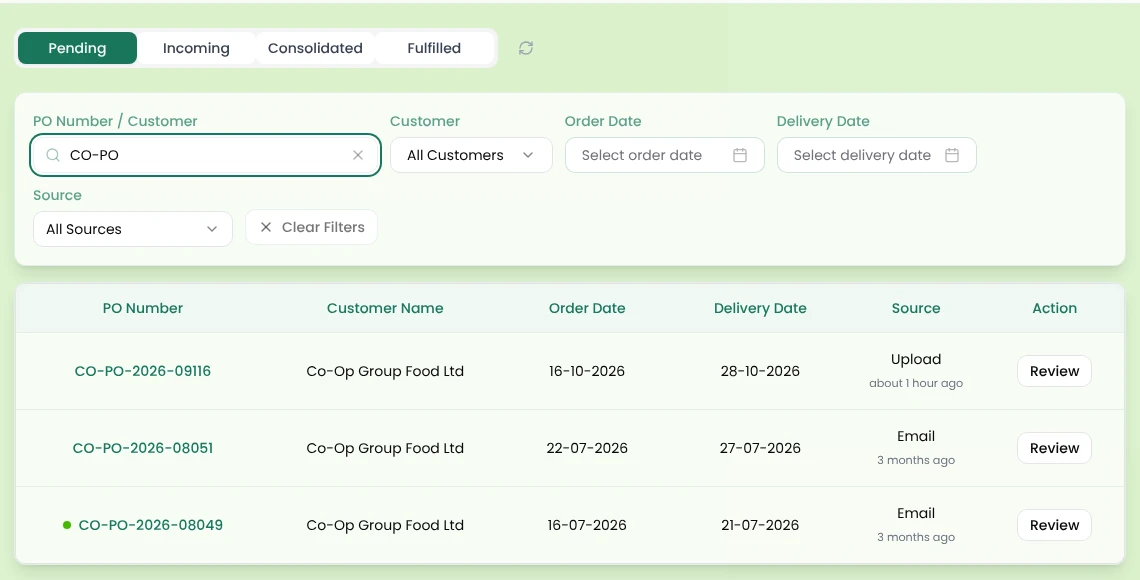
Pesto reads POs from PDF, Excel, CSV, image and email, takes EDI through your EDI system (e.g. TrueCommerce, Supply Lens, XEDI), and pulls in Shopify orders. It finds the depot by GLN, then postcode, then address, and matches each line by your customer's own product code. It fills missing prices from the customer's price list and flags mismatches. You review each order beside the original document before approving it.
Pesto then picks lots by FEFO or FIFO with your shelf-life rules, generates delivery notes with batch code and use-by, routes orders to your 3PL's system (e.g. Mintsoft, Pimento, Hive), and creates Xero invoices from what you dispatched. → Order management
Frequently asked questions
What's the difference between order management software and an ERP?
Order management covers the journey from order to invoice. An ERP usually adds stock, purchasing, production, costing and finance. Many food brands start with order management because that's where most of the manual hours sit.
Do I need order management software if I already use EDI?
EDI brings retailer orders in as structured data, but only for customers who use it. Your PDFs, spreadsheets and emails still need handling, and EDI alone doesn't allocate batches or raise invoices.
Can't Shopify handle my orders?
Shopify handles orders that come through your Shopify store. Retail, wholesale and foodservice buyers mostly send orders by EDI, PDF or email instead, so you need a system that reads those too.
What's FEFO?
First expired, first out. You ship the stock with the earliest use-by date first, as long as it meets the customer's minimum shelf life.
How long does it take to move order management off spreadsheets?
That depends on how many customers and formats you have, and how clean your product and price data is. Getting your customer product codes and price lists in order first speeds things up.
See Pesto running on your own orders.
Bring a real PO, your messiest one. We'll show you what Pesto does with it in 30 minutes.
Book a demo